




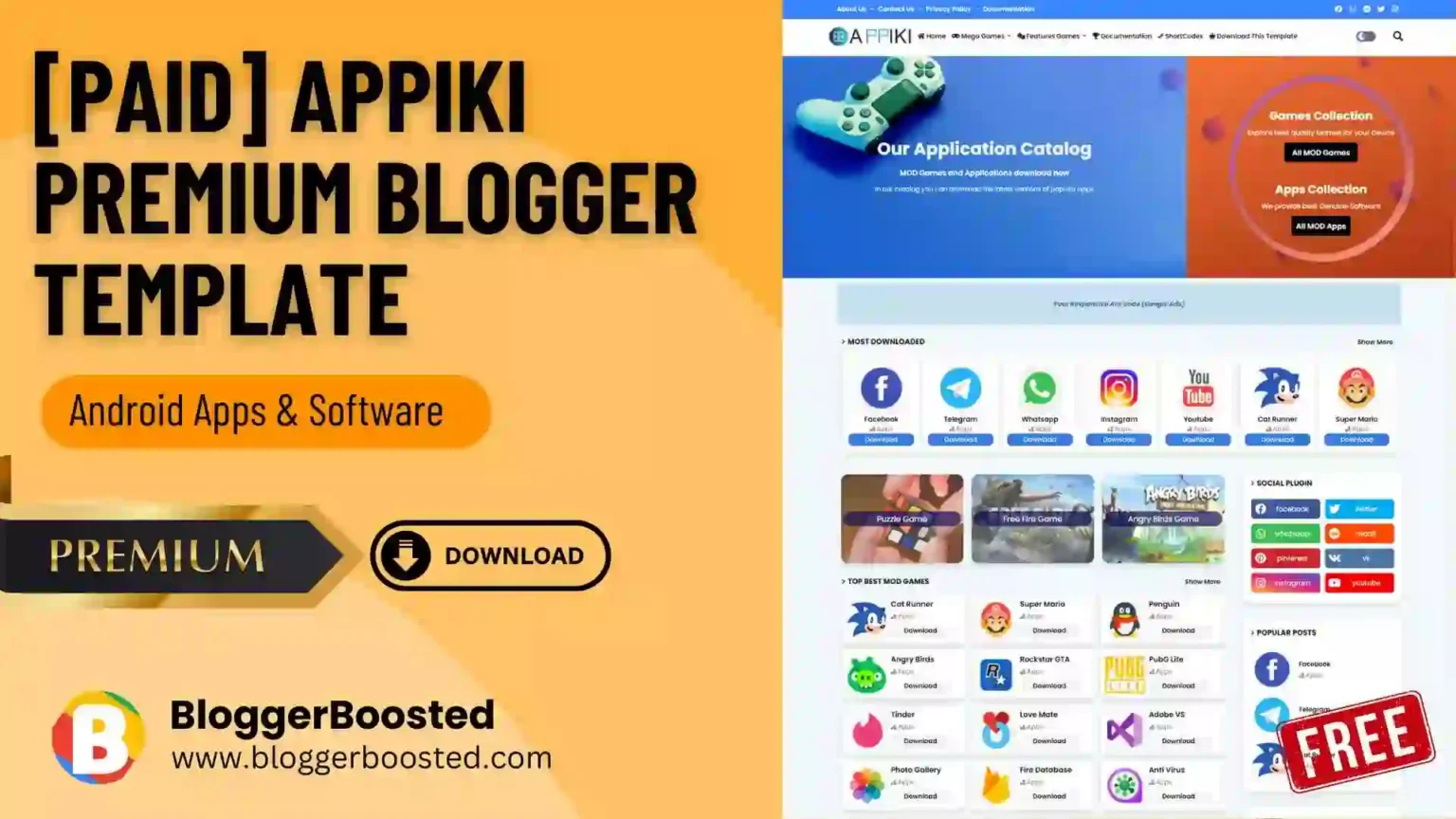
Looking for a Free and powerful Blogger template for an app download website, app review, or software website? Appiki is a Blogger theme specifically designed around the concept of an app store and app-download website.
- What Is Appiki Blogger Template?
- Who Should Use Appiki Blogger Template?
- The Growing Demand for Third-Party App Download & Review Websites
- Why Should You Use Appiki on Your Website?
- Appiki Blogger Template Features
- Appiki Free vs Premium
- Appiki Blogger Template Pros and Cons
- Is Appiki Good for an App Download Website?
- Is Appiki Good for SEO?
- Best Content Strategy for an Appiki Website
- How to Install Appiki Blogger Template
- Get Appiki Premium from the Official Vendor
- Appiki Blogger Template: Final Verdict
- Frequently Asked Questions
The template combines a modern responsive design with SEO-focused features, structured data, customizable sections, app-focused post layouts, and features that make it easier to build an app directory or app review website on Blogger.
Appiki is developed by PikiTemplates and is available in both free and premium versions. The official vendor currently lists Appiki version 2.1.0, with the latest update dated August 20, 2026.
What Is Appiki Blogger Template?
Appiki Blogger Template is a specialized Blogger theme designed primarily for app download websites and app review blogs.
Unlike a general-purpose Blogger theme, Appiki is structured around publishing application-related content. This makes it particularly suitable for websites where each post provides information about an Android application, Windows software, mobile app, game, tool, or other downloadable resource.
According to PikiTemplates, Appiki is designed to provide app-store functionality for bloggers while maintaining a fast, responsive, customizable, and SEO-oriented structure.

Who Should Use Appiki Blogger Template?
Appiki is not necessarily the best choice for every Blogger website. Its biggest advantage is its specific app-store-oriented design.
This template is particularly suitable for:
1. App Download Website Owners
If you want to build a website where visitors can discover and download applications, Appiki is one of the more relevant Blogger templates to consider.
You can create individual posts for different applications and organize them through categories and labels.
2. App Review Bloggers
Appiki is also suitable for bloggers who review mobile applications, software, utilities, and digital tools.
For example, you could publish:
- App reviews
- App features
- New app releases
- App comparisons
- Android application guides
- Software reviews
- App tutorials
- App alternatives
- Best apps lists
3. Android App Publishers
If your website focuses primarily on Android applications, Appiki’s app-store-style design can make your content look more appropriate than a generic blog theme.
4. Software and Tool Review Websites
You can also adapt Appiki for websites covering software, utilities, online tools, and digital products.
5. Tech Bloggers
Technology bloggers who frequently publish application-related content can use Appiki to create a dedicated technology or app-focused publication.
6. Beginners Using Blogger
Appiki can be useful for beginners who want an app-focused website without building an app directory from scratch.
The official theme includes documentation and layout-based customization options intended to simplify setup.
The Growing Demand for Third-Party App Download & Review Websites
As the number of mobile apps, desktop software, and digital tools continues to grow, users increasingly look for independent websites that review, compare, explain, and help them discover new applications before installing them. Third-party app websites can provide useful information such as features, screenshots, compatibility, alternatives, tutorials, and user-focused reviews that may not be available on official app stores. This creates an opportunity for bloggers and digital publishers to build app download and review websites that attract search traffic, build an audience, and monetize through advertising, affiliate marketing, sponsored content, and software partnerships.
Why Should You Use Appiki on Your Website?
1. It Is Designed for the App Download Niche
The biggest reason to choose Appiki is its niche-specific design.
Instead of adapting a generic magazine theme into an app website, Appiki is already designed around the concept of an app store and app download platform.
This can help create a more consistent experience for visitors searching for applications.
2. Responsive and Mobile-Friendly
App websites receive significant mobile traffic, so responsive design is particularly important.
PikiTemplates describes Appiki as responsive, mobile-friendly, and optimized to work across different devices.
3. SEO-Oriented Structure
Appiki is marketed as an SEO-optimized Blogger template with meta tags, SEO-focused implementation, and structured data.
The theme also includes optimized Schema structured data intended to help search engines better understand website content.
However, using an SEO-friendly theme does not guarantee Google rankings. Your app descriptions, original content, search intent, internal linking, backlinks, website reputation, and overall SEO strategy remain important.
4. Easy Customization
The official documentation states that many elements can be customized through Blogger’s Layout section, including colors, logos, and menu items.
This is particularly useful for beginners who don’t want to edit HTML every time they make a basic design change.
5. Fast-Loading Design
PikiTemplates positions Appiki as a fast-loading template with performance optimization.
A lightweight theme can provide a better browsing experience, particularly for visitors accessing an app website from mobile devices or slower connections.
Appiki Blogger Template Features
The official Appiki page lists a broad range of features across its free and premium versions. Key features include:
- Responsive and mobile-friendly design
- SEO optimization
- Dark mode
- Dark logo support
- App-focused layout
- Sidebar custom posts
- Featured post section
- Custom post shortcodes
- Button post shortcodes
- Custom featured-post sections
- AJAX mega menu
- RTL / automatic language support
- Custom in-post advertisement code
- Subscribe form
- Facebook and Disqus comments
- Cookie consent
- Structured data
- Documentation
- Premium customer support
- Lifetime updates with the premium license
The official feature comparison should be checked before purchase because some features are restricted to the premium version.
Appiki Free vs Premium
PikiTemplates provides both a free version and premium version of Appiki.
The free version can be useful for testing the design and starting a basic website.
The premium version is more suitable if you want additional functionality and ongoing support.
The official premium listing currently includes:
- One-time payment
- Future template updates
- Lifetime premium support
The official page currently displays the premium license at $7.50, although pricing can change, so check the vendor page before purchasing.
Appiki Blogger Template Pros and Cons
Is Appiki Good for an App Download Website?
Yes, Appiki is particularly well suited to app download websites. Its purpose-built design is one of the strongest reasons to choose it over a generic Blogger template.
For example, you could structure your website around categories such as:
- Android Apps
- Windows Software
- Productivity Apps
- Social Media Apps
- Photography Apps
- Video Editing Apps
- Music Apps
- Utility Apps
- Education Apps
- Games
- AI Apps
- VPN & Security Apps
Each application can then have its own detailed article containing the app description, features, version information, screenshots, compatibility information, installation instructions, and an appropriate download or official-store link.
Important: If you publish app-download content, make sure the applications and download links you provide are legitimate and that you have the appropriate rights to distribute or link to the software.
Is Appiki Good for SEO?
Appiki is a strong technical starting point for an app-focused Blogger website because the vendor describes it as SEO optimized and includes structured-data functionality.
But your actual SEO performance will depend on much more than the template.
For an Appiki website, focus on:
- Original app descriptions
- Search-intent-focused titles
- Useful application information
- Proper category and label structure
- Internal linking between related apps
- Descriptive image alt text
- Fast-loading pages
- Mobile usability
- Helpful FAQs
- Comparison content
- App alternatives content
- Regular content updates
- Legitimate backlinks
For example, instead of publishing only “WhatsApp APK Download”, create a genuinely useful page covering the app’s features, supported devices, latest version information, installation instructions, privacy considerations, alternatives, and official download options.
That provides substantially more value than a thin download page.
Best Content Strategy for an Appiki Website
If you are building a new Appiki website, don’t publish hundreds of thin download pages immediately.
Build topical authority around specific app categories.
For example:
Category: Video Editing Apps
→ Best Video Editing Apps for Android
→ CapCut Review
→ CapCut Alternatives
→ VN Video Editor Review
→ Best Free Video Editors
→ Video Editing Apps for Beginners
→ Best Video Editors Without Watermark
Then connect these articles with internal links.
This gives your Appiki website a stronger topical structure than simply publishing isolated download pages.
How to Install Appiki Blogger Template
The basic installation process is straightforward:
- Download the Appiki template from a legitimate source.
- Back up your current Blogger theme.
- Open your Blogger Dashboard.
- Go to Theme.
- Upload or install the Appiki XML theme according to the vendor’s documentation.
- Save the changes.
- Configure your logo and navigation menu.
- Set up homepage sections.
- Configure widgets and labels.
- Add your required advertisement and social media settings.
- Test the website on mobile and desktop.
- Review your pages before publishing the website.
For detailed configuration, use the official Appiki documentation provided by PikiTemplates. The vendor specifically provides documentation covering the theme’s setup and customization.
Get Appiki Premium from the Official Vendor
If Appiki fits your website, we recommend purchasing it directly from PikiTemplates rather than using an unofficial or modified copy.
The official premium license currently includes future template updates and lifetime premium support. The vendor currently lists the premium license at $7.50 as a one-time payment, but check the official page for the latest price before purchasing.
🚀 Recommended: Get Appiki Premium
Build your app download or app review website with the official Appiki Blogger Template.
👉 Get Appiki Premium from PikiTemplates →
https://pikitemplates.com/2021/07/appiki-blogger-template.html
Why buy from the official vendor?
- Get the legitimate theme
- Receive future template updates
- Access premium support
- Avoid potentially modified or unsafe theme files
- Get official documentation
- Support the original theme developer
Affiliate disclosure: This post may contain affiliate links. If you purchase Appiki through our link, we may earn a commission at no additional cost to you. We recommend purchasing directly from the official vendor to receive the legitimate product, updates, documentation, and applicable support.
Appiki Blogger Template: Final Verdict
Appiki is one of the better Blogger template choices for users specifically building an app download, app review, software, or technology website.
Its biggest advantage is its purpose-built app-store design. Instead of starting with a generic Blogger theme and trying to transform it into an application directory, Appiki provides an app-focused foundation.
Its responsive design, SEO-oriented structure, structured data, customization options, dark mode, documentation, and premium support make it a practical option for Blogger users who want to build an app-focused website.
However, it isn’t necessarily the right theme for everyone. If your website is a general blog, portfolio, news site, or personal website, another Blogger theme may provide a better fit.
Our recommendation: If your primary goal is to build an app download, app review, software directory, or technology-focused Blogger website, Appiki is worth considering.
Frequently Asked Questions
Is Appiki a free Blogger template?
Yes. PikiTemplates currently provides a free version of Appiki as well as a premium version.
Is Appiki good for an app download website?
Yes. Appiki was specifically designed around the concept of an app store and app-download website, making it particularly suitable for this niche.
Is Appiki SEO friendly?
The developer describes Appiki as SEO optimized and includes structured-data features. However, a theme alone cannot guarantee search-engine rankings.
Is Appiki mobile friendly?
Yes. The official feature list identifies Appiki as responsive and mobile friendly.
Does Appiki support dark mode?
Yes. Dark mode and dark-logo functionality are included among the listed Appiki features.
Who should use Appiki?
Appiki is best suited to app download websites, app review blogs, Android app publishers, software websites, technology bloggers, and other websites focused on applications and digital tools.
Is Appiki available in a premium version?
Yes. PikiTemplates offers a premium license in addition to the free version. The current official listing includes future updates and lifetime premium support.
Where can I get the official Appiki Blogger Template?
You can get Appiki directly from PikiTemplates, the original vendor. The official product page provides the free version, premium license, documentation, demo, and other theme information.